Programs
#include <stdio.h>

int main(void) {
  unsigned int number = 4294967295;
  int number_size = sizeof(number);

  printf("%p\n", &number);
  printf("%i\n", number_size);

  return 0;
}
A program is a specific set of instructions written in a programming language designed to carry out a specific task. The plain text, human-readable, written instructions of a program are called the program’s source code. Anything that runs on a computer is a program.
These instructions are built from a few core ideas: syntax, statements, expressions, and data.
Programming Languages
A programming language is a language that a program is written in. Programming languages are described in terms of their syntax and their semantics. Every programming language has different syntax and semantics.
- Syntax (form) – The rules that define the combinations of symbols to be correctly structured statements or expressions. Syntax is how we put words together to create valid instructions the computer can understand. In other words, syntax is the grammar of a programming language. Breaking syntax rules results in a syntax error.
- Semantics (meaning) – What the statements or expressions mean to the computer. Can the computer understand what we’re telling it, or is there an error?
Programming languages can be broken down into two main categories: high-level languages and low-level languages.
- High-level languages have a strong abstraction from the details of the computer and are designed to be easy for humans to read and write. Examples of high-level languages include Java, Python, and Ruby.
- Low-level languages provide little to no abstraction from a computer’s underlying physical hardware. Examples of low-level languages include assembly language and machine language.
Assembly language is a human-readable version of machine language and is machine-dependent, meaning that the instructions and syntax used are specific to the computer’s CPU instruction set architecture (ISA). Different CPUs have different mnemonics, which are short abbreviations or symbolic names that represent machine language instructions (INP, OUT, ADD, MOV). Some popular assembly languages include x86 assembly, ARM assembly, and MIPS assembly.
Machine language, also known as machine code, is the elemental language of computers, and consists of machine language instructions that are composed entirely in binary. These binary numbers can be represented by using hexadecimal and correspond to commands or operations that tell the machine’s components exactly what to execute. It is the only language that computer hardware can understand.
Comments
Comments allow developers to write notes for humans. These notes are ignored by the computer. Comments explain code and help made it readable.
# This is a comment in a shell script!Statements & Expressions
The two fundamental aspects of a program are expressions and statements.
- A statement is a complete instruction that tells the computer to do something.
- An expression is code that produces a value.
Statements
A statement is a single line of code or code block that instructs the computer to do something, such as assigning a value to a variable, calling a function, or controlling the flow of a program. Programs are mostly sequences of statements.
x = 10
print(x)
Expressions
An expression evaluates to a value. Expressions are often used inside statements.
2 + 3   # evaluates to a number
x * 10  # evaluates to a number
x > 5   # evaluates to True or False (boolean)
Variables & Data
Variables
A variable is a named container used to store an expression, statement, or function. Variables are newly created location in memory used to store and persist data that allow for easy access and reusability.
name = 'Grant'Data Types
Data refers to a collection of values that convey information for reference or analysis. A datum is an individual value within that larger collection of data.
All data has a data type, which is a classification on what type the data or datum is. Data can be anything: numbers, letters, sentences, special characters, a combination of numbers and letters etc.
There are three main data types in a program:
- Strings - Includes a combination of characters.
- Numbers
- Integers - Whole numbers
- Floats - Decimal numbers
- Booleans - Includes true/false, yes/no logic.
5       # integer
3.14    # float
"Grant" # string
False   # boolean
Data types matter because different operations work on different types, and mistakes can cause errors.
Operators
Operators do things to values. They perform operations on data. They can either combine or compare values, and are usually part of expressions.
Different types of operators:
- Arithmetic
- Comparison
- Logical
+ - * / %         # arithmetic
== != < > <= >=   # comparison
and or not        # logical
Control Flow
Control flow refers to how a program flows or the steps it takes from start to finish. There are many ways to control the flow of a program:
- Sequences - Linear completion. A series of instructions that are completed in chronological order.
- Jumps (Unconditional Branches) - A leap. The program jumps to another set of instructions.
- Selections (Conditionals Branches) - A choice. The program asks a question in order to figure out what path to take next.
- Iterations (Loops) - Repetition. A series of instructions that asks the same question over and over again until a specific condition is met or a certain task is complete.
- Subroutines (Functions) - Chunks. A series of instructions that perform a specific task and can be reused, often with changing input, and are given a name.
A program will execute instructions sequentially, line-by-line, until all the instructions have been executed. The issue with this is programs can get very long, very fast. We can better organize programs through control structures (jumps, selections, iterations) and subroutines.
Conditionals
A conditional asks questions and makes decisions in code.
There are different types of conditionals: if, if/else, if/elseif/else.
Common Types of Conditionals
- if -
- if / else -
- if / else if / else -
if age >= 18:
    print("Adult")
else:
    print("Minor")
Loops
A loop repeats actions. Recursion is also another form of a loop that calls itself.
Common Types of Loops
- For Loop - Used to iterate over something a set number of times or a set size.
- While Loop - Used to iterate over something only while a certain condition is true or false.
- Infinite Loop - Used to iterate over something continuously, without stopping until something breaks out of it.
for i in range(3):
  print(i)
for (int i = 0; i < 10; i++) {
printf('Hello!');
}Functions
A function is a grouping of statements that perform a specific task. Functions can be reused and help to organize code and reduce the total number of lines of code that need to be written. The answer returned by a function is known as the return value of the function.
Functions can be ran immediately or at a later time in the program. Functions that run immediately and don't have a name are known as anonymous functions, while functions that can run at a later time and do have a name are known as named functions. Named functions commonly have a name that describe the task they're performing.
Parameters are the labels used when declaring a function, while arguments are the specific values used when calling a function.
function greet(name) {
console.log(`Welcome ${name}!`);
}

greet('Grant');
Data Structures
const days = ['Monday', 'Tuesday', 'Wednesday', 'Thursday', 'Friday', 'Saturday', 'Sunday'];

const grant = {
  "name": "Grant",
  "age": 29,
  "location": "Erie, Colorado"
}
A data structure is a way to organize, store, and access data. Some common data structures include:
Common Types of Data Structures
- Arrays - Also known as lists, arrays are ways to sequentially, or linearly, store data.
- Hash Maps (Hashes) - Also known as dictionaries, hash maps are unordered lists that store data in key-value pairs.
- Sets - Collections of unique values with no particular order. They are useful for quickly checking whether an item exists.
- Trees - Hierarchical data structures consisting or nodes connected by edges, often used to represent relationships like family trees or file systems.
- Graphs - Collections of nodes (vertices) connected by edges, used to represent networks, such as social networks or road maps.
Linked Lists – A sequence of nodes where each node points to the next. Useful for efficient insertion and deletion.
Stacks – Collections of elements that follow Last In, First Out (LIFO). Think of a stack of plates.
Queues – Collections of elements that follow First In, First Out (FIFO). Like a line at a checkout.
Priority Queues / Heaps – Special types of queues where each element has a priority, and the highest (or lowest) priority element is served first.
Tries (Prefix Trees) – Trees used to store strings efficiently, often for searching words in dictionaries or autocomplete.
Linked Hash Maps / Ordered Dictionaries – Variants of hash maps that maintain insertion order.
Programming Paradigms
A programming paradigm is a way in which a program or programming language can be organized. Each paradigm consists of certain structures, features, and opinions about how common programming problems should be tackled.
A programming paradigm can be thought of as a set of ideals or guidelines that many people have agreed on, followed, and expanded upon.
- Imperative Programming - Focuses on how a program achieves a result by specifying a sequence of commands.
- Procedural Programming - Focuses on a sequence of instructions or procedures to solve a problem.
- Functional Programming - Emphasizes the use of functions as the primary building blocks, with a focus on immutability and avoiding side effects.
- Declarative Programming - Focuses on what the program should do, rather than how it should do it.
- Object-Oriented Programming (OOP) - Organizes programs around "objects" that contain data and methods (functions).
The Four Pillars of Object-Oriented Programming
- Abstraction - Complex logic is hidden away. Methods can be called, but we don’t need to see what those methods do.
- Encapsulation - Bundles data (attributes) and methods that operate on that data within a single class, and restricts direct access to the data from outside the class, promoting data security and organization.
- Inheritance - Objects are instances of a class. Classes are instances of other classes or a module. Classes can inherit from their parents, grandparents etc.
- Polymorphism - Objects that share an inheritance chain can respond to the same method call in their own specific ways.
Classes
A class is a blueprint for an object. Classes define attributes and properties (data) and methods and behaviors (functions) that the objects created from them will have.
Methods are functions that are created inside (and are part of) an object.
Objects
An object is an instance of a class. Each object is a specific, usable version of the class that has its own attributes and methods and actual values for its properties.
Executing Programs
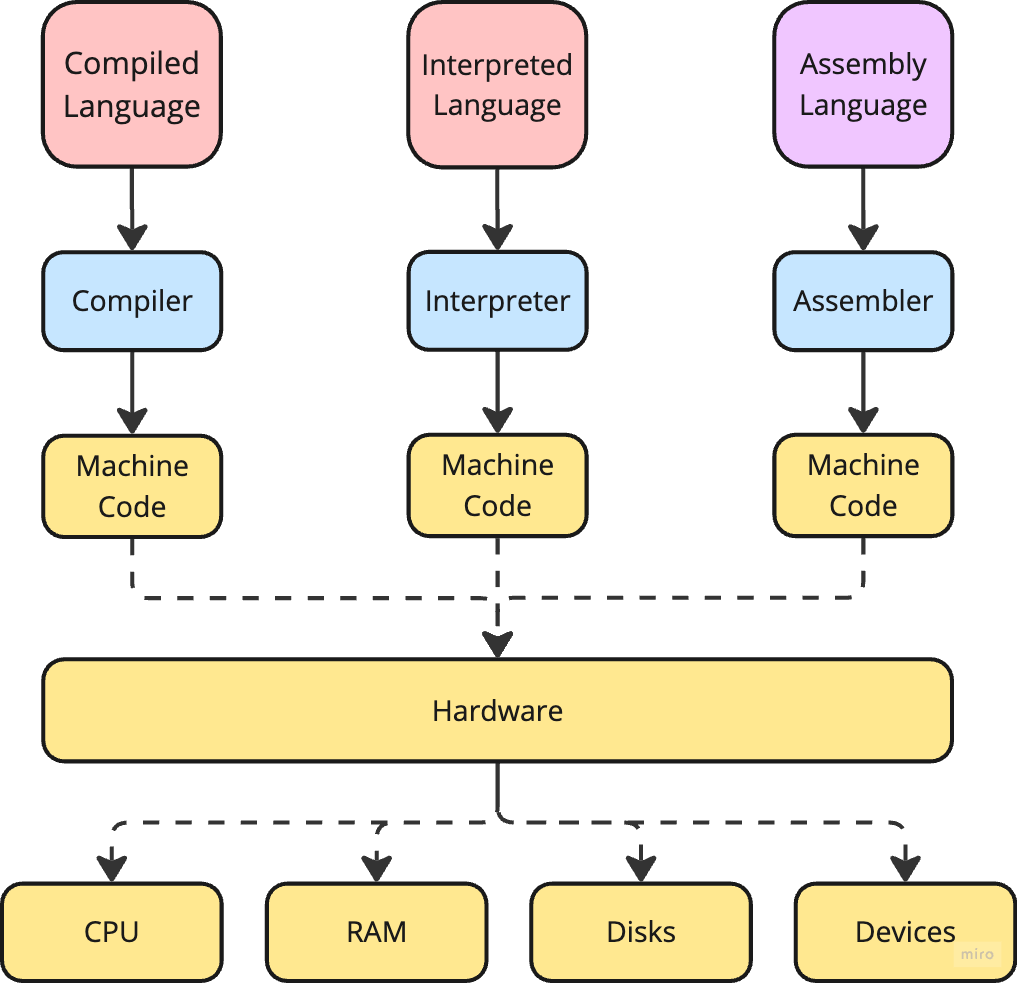
In order for a program to be read and executed by the computer’s hardware, there needs to be a system in place that translates the program’s source code into machine code so the computer can understand it. That’s where a programming language implementation comes in. A programming language implementation is a system for executing computer programs. There are two general approaches when it comes to programming language implementation:
- Interpretation – The program is read as input by an interpreter, which translates the source code into machine code line-by-line as the code runs.
- Compilation – The program is read by a compiler, which translates the source code all at once into machine code before the program runs.
Interpreters and compilers both take source code and convert it into computer-readable machine code. However, there are some key differences.
Interpreters run slowly but start translating line-by-line right away, and let you see the results quickly. This makes it easier to write, debug, and modify the source code if there are any problems. Interpreters are also programming language specific, meaning that every interpreted programming language needs its own interpreter to execute the program's source code.
Compilers require some extra preparation time at the beginning to "build" the program, but once built, the program runs very quickly. Compilers are programming language specific, meaning that every compiled programming language needs its own compiler to execute the source code. Compilers are also machine-specific and specific to a CPU's ISA.
Assemblers are programs that translate assembly language into machine code. Their input is low-level code.
Below are some examples of different types of programming languages.
- Interpreted Programming Languages - Includes HTML, JavaScript, Ruby, PHP, R, SQL.
- Compiled Programming Languages - Includes C, C#, C++, Erlang, Haskell, Rust, Go, Kotlin.
- Hybrid (both) Programming Languages - Includes Java, Python.
Scripts
A script is a series of short instructions that a computer can follow to achieve a specific goal, or to automate an otherwise manual process. A script can be thought of as similar to a recipe, a handbook, or a manual - it is a sequence of steps that, when followed, produces a desired outcome. A web browser may use different parts of a script depending on how the user interacts with the web page. Scripts can run different sections of code in response to the ever-changing situation around them. Scripts are meant to help with automation, reducing repetitiveness, and increasing productivity.
Some examples of different types of scripting:
- Command Line or Shell Scripting - Basic scripts can be written directly into the command line of an operating system, allowing for quick execution of simple tasks. These are referred to as shell scripts.
- Client-Side Scripting - Scripts written in languages like JavaScript can be embedded within HTML pages to dynamically manipulate web content and respond to user interactions.
- Server-Side Scripting - Scripts written in languages like PHP, Python, or Ruby, can be used to perform tasks on a web server, like handling data processing and generating dynamic content.