Algorithms
An algorithm is a very detailed, step-by-step, sequence of instructions used to solve a problem, achieve a task, or perform a computation.
One common analogy for an algorithm is a recipe in a cookbook. A recipe is a sequence of instructions that, when followed, produces a desired outcome outcome or dish.
Many algorithms require input data to perform their operations, but this is not always the case.
Creating an Algorithm
An algorithm should be:
- Well-defined - The steps of an algorithm should be clear and unambiguous.
- Finite - An algorithm should terminate after a finite number of steps.
- Effective - The steps of an algorithm should be able to be performed in a finite amount of time.
To create an algorithm, you need to first define your goal and then list out the individual steps that need to be completed in order to achieve that goal.
- Define the Goal - Define the task you want to achieve. You can think of this as a puzzle for the computer to solve. What do you want the computer to do?
- Break Down the Steps - Split the goal out into a series of tasks that are going to be involved in solving the puzzle. Write down individual steps that the computer needs to perform in order to complete each task (and any information it needs to perform the task), rather like writing a recipe that it can follow.
- Convert to Code - Each of the steps needs to be written in a programming language that the computer understands.
Flow Charts
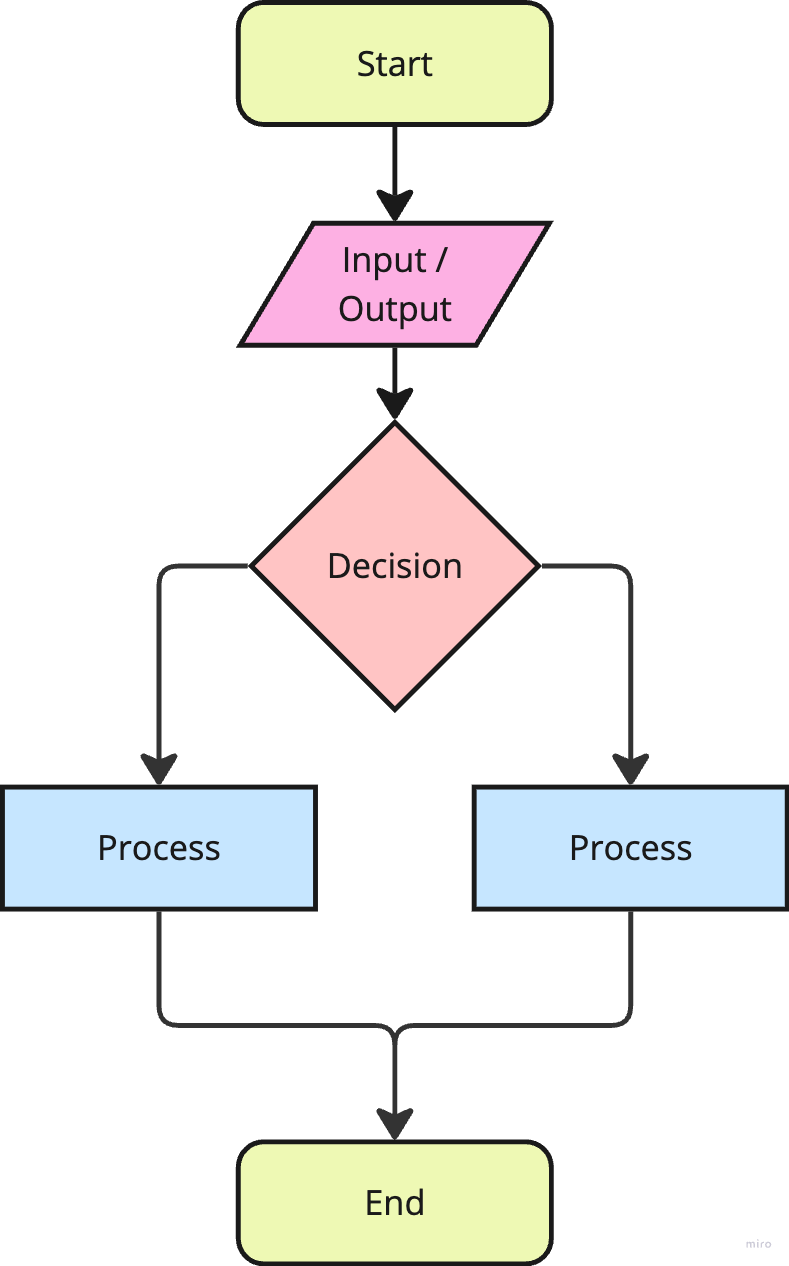
A flow chart is a diagrammatic or visual representation of an algorithm that uses symbols and arrows to depict the steps and flow of logic.
Flow charts have four primary symbols:
- Terminal - Oval or rounded rectangle, indicating the start and end of the process.
- Process - Rectangles, representing a step or action in the algorithm.
- Decision - Diamonds, representing a decision point or condition that determines the flow.
- Input / Output - Parallelogram, indicating input or output operations.
- Flow Line - Arrows, connecting the symbols and showing the direction of the process.
Big O Notation
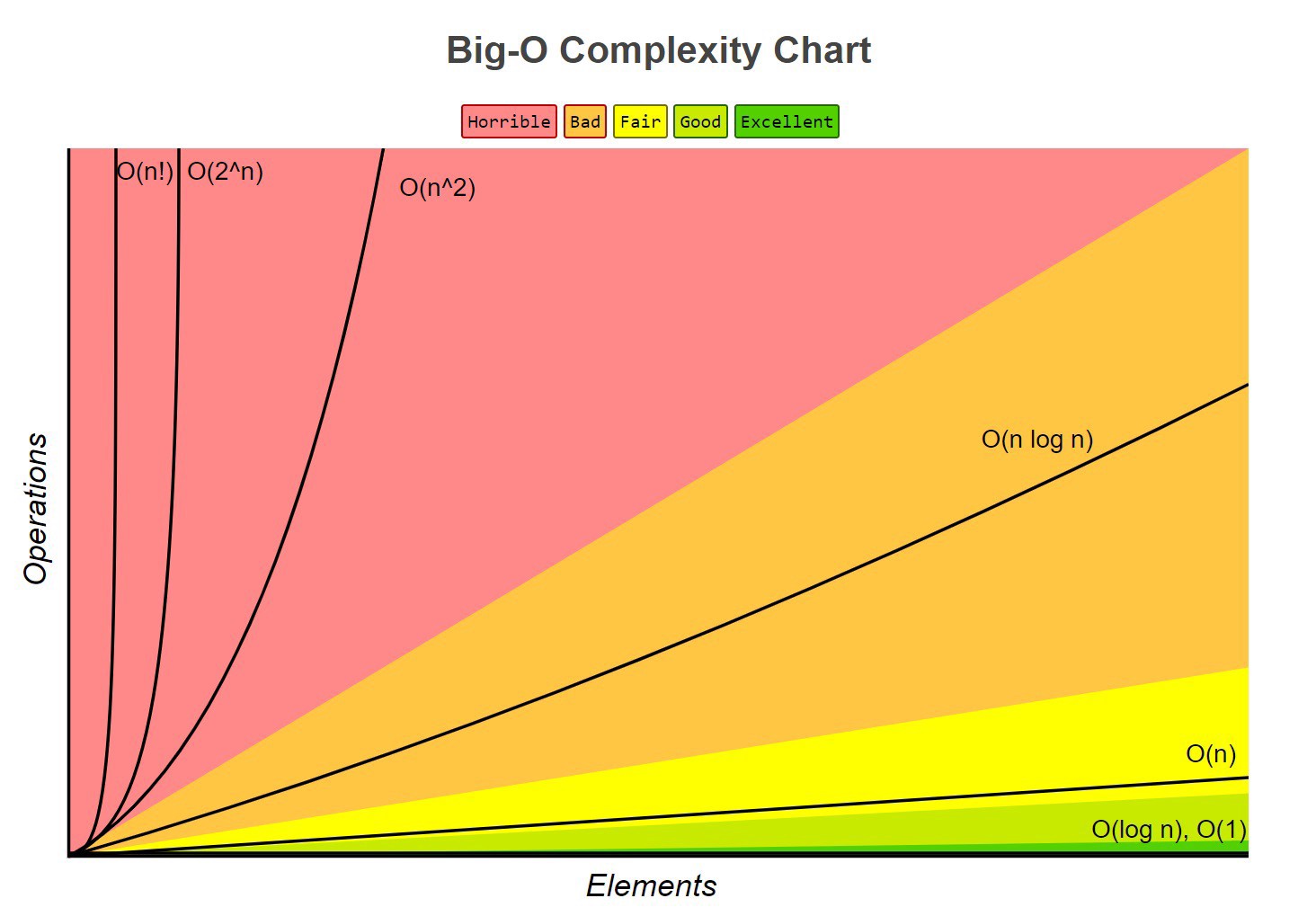
Big O notation, or Big-O, is a tool used to classify algorithms according to how their runtime (time complexity) or space requirements (space complexity) scales as the input size increases. Big-O is a way to express the upper bound of an algorithm's time or space complexity.
Big-O is all about the number of steps vs the size of input. If the input doubles, do you get the same steps, double the steps, 4x the steps etc.
- Time Complexity - The execution time of an algorithm, as a function of the input size.
- Space Complexity - The amount of space an algorithm requires in memory, as a function of the input size.
- Big-O describes the asymptotic behavior (order of growth of time or space in terms of input size) of a function, not its exact value.
- Big-O can be used to compare the efficiency of different algorithms or data structures.
- Big-O provides an upper limit (worst case scenario) on the time taken by an algorithm in terms of the size of the input.
- Big-O is denoted as O(f(n)), where f(n) is a function that represents the number of operations or steps that an algorithm performs to solve the problem of size n.
Different Big O Time Complexities:
- O(1) - Constant time complexity.
- O(log n) - Logarithmic time complexity.
- O(n) - Linear time complexity.
- O(n log n) - Log linear time complexity.
- O(n^2) - Quadratic time complexity.
- O(2^n) - Exponential time complexity.
- O(n!) - Factorial time complexity.
O(1) is considered the best because it means that an algorithm's run time stays the same regardless of the input size.
O(n!) is considered the worst because it means that an algorithm's run time grows extremely rapidly as the input size grows.
Tips for Optimizing Big-O
- When iterating, aim for one pass (as opposed to multiple).