How the Web Works
The Initial Connection
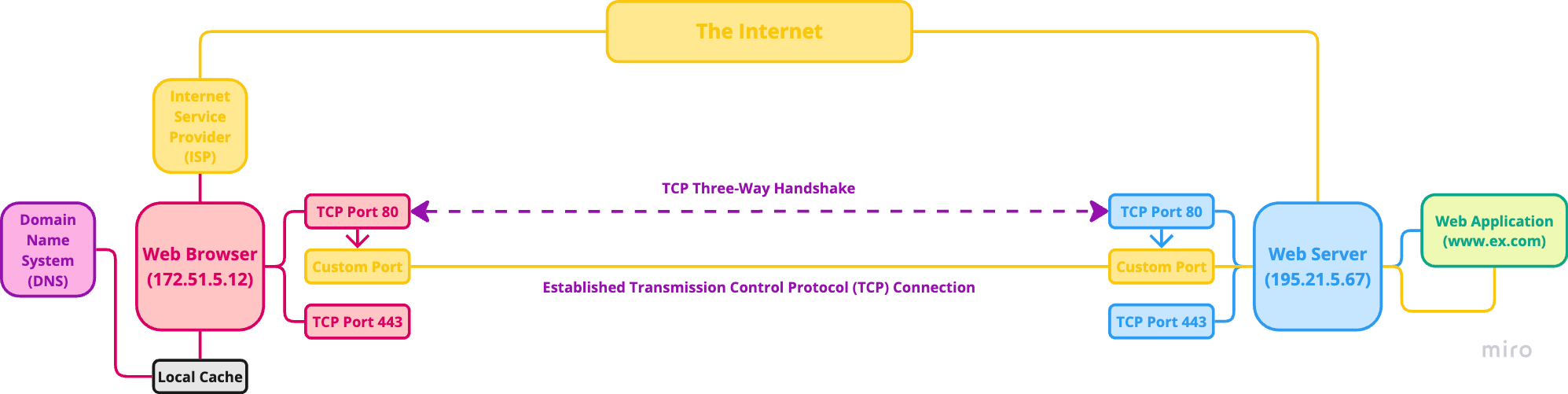
- In order for a client and server to talk, the client first needs to be connected to the internet via an Internet Service Provider (ISP), which is a company that offers internet access. Some examples of ISPs include CenturyLink, AT&T, and Comcast.
- Once connected to the internet, the client joins millions of other clients and servers in a large, globally connected network. In order to talk to a specific server that hosts a specific web page or web application, the client first needs to find it and establish a connection to it. Each device on the internet has a unique Internet Protocol (IP) address, which is the location of that particular device on the internet, and looks something like (172.74.1231.51.5). Servers can be located anywhere in the world, so to find them and their IP address, the client uses the Domain Name System (DNS), which is a large network of servers that act like a giant phone book, looking up the domain typed into the client and returning the IP address associated with that particular domain.
- The Internet is a worldwide network of networks that uses the Internet Protocol (IP) suite.
- Internet Protocol (IP) is a communication protocol that helps devices find each other.
- With the IP address of the server known, the client then sends a HyperText Transfer Protocol (HTTP) request to the server using either Port 80 (HTTP) or Port 443 (HTTPS). The server is listening for incoming requests on both of these ports. To establish a Transmission Control Protocol (TCP) connection, the client and the server first need to agree on a set of parameters, which is done through a TCP Three-Way Handshake. The TCP connection is established using the client IP address, the client port number, the server IP address, and the server port number.
- HyperText Transfer Protocol (HTTP) is an application-layer protocol that defines a language for clients and servers to speak to each other.
- Transmission Control Protocol (TCP) is a communication protocol that ensures data is delivered accurately. It does this by breaking messages down into small packets and sending them to their destination, where they are later rebuilt.
- TCP Three-Way Handshake refers to the three steps needed to establish a TCP connection.
- The client sends the server a "synchronize" (SYN) message with its own sequence number (x), which the server receives.
- The server responds with a "synchronize-acknowledgement" (SYN-ACK) message with its own sequence number (y) and acknowledgement number (x + 1), which the client receives.
- The client replies with an "acknowledgement" (ACK) message with the acknowledgement number (y + 1), which the server receives and doesn't meed tp reply.
- Once the TCP connection is established, the Secure Sockets Layer (SSL) / Transport Layer Security (TLS) handshake takes place, creating a safe and secure encrypted communication channel between the client and the server. The server processes the HTTP request and returns a HTTP response (usually with a body of HTML, CSS, and JavaScript).
- Secure Sockets Layer (SSL) was the old standard security technology for creating an encrypted network link between a client and a server, ensuring all data passed is private and secure.
- Transport Layer Security (TLS) is a client/server protocol used by applications to communicate securely across a network, preventing tampering with and eavesdropping on email, web browsing, messaging, and other protocols.
- With the connection now established, the client and server are free to talk to each other as long as they want.
Sending the Request
Rendering the Response
The Document Object Model (DOM)
The Document Object Model (DOM) is the data representation of the objects that comprise the structure and content of web pages (a document on the web). Web browsers create models of the web page they are showing and of the browser window that the page is being shown in.
// Window Object

console.log(window.location.href);

// Document Object

console.log(document.title);
console.log(document.lastModified);- Window Object - The browser represents each window or tab using a window object. The location property of the window object will you the URL of the current page.
- Document Object - The current web page loaded into each window is modelled using a document object. The title property of the document object tells you what is between the opening and closing title tags for that web page, and the lastModified poperopty of the document object tells you the date this page was last updated.
The Document Object Represents an HTML Page
Using the document object, you can access and change what content the user sees on the page and respond to how they interact with it.
- Properties - Properties describe characteristics of the current web page (such as the title of the page).
- Methods - Methods perform tasks associated with the document currently loaded in the browser (such as getting information from a specific element or adding new content).
- Events - You can respond to events, such as a user clicking or tapping on an element.
The document object is just one of a set of objects that all major browser support. When a browser creates a model of a web page, it not only creates a document object, but it also creates a new object for each element on the page. Together, these objects are described as the Document Object Model (DOM).
How a Web Browser Sees a Web Page
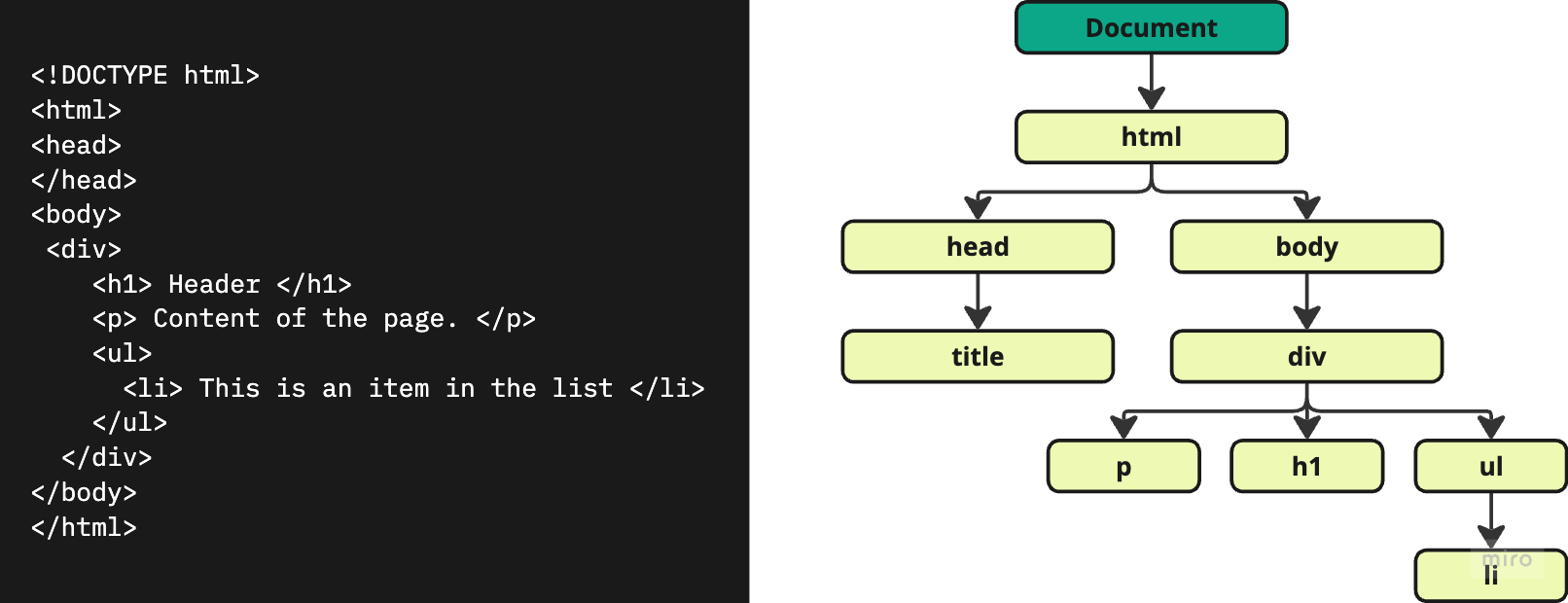
- The Browser Receives a Page as HTML Code - Each page on a website can be seen as a separate document. So, the web consists of many sites, each made up of one or more documents.
- The Browser Creates a Model of the Page and Stores it in Memory - The structure is reminiscent of a family tree. At the top of the model is a document object, which represents the whole document. Beneath the document object, each box is called a node. Each of these nodes is another object. These different nodes represent elements, text within elements, and attributes.
- The Browser Uses a Rendering Engine to Show the Page on the Screen - If there is no CSS, the rendering engine will apply default styles to the HTML elements. If there is CSS, the browser requests that file and displays the page accordingly. When a browser receives CSS rules, the rendering engine processes them and applies each rule to its corresponding elements. This is how the browser positions the elements in the correct place, with the right colors, fonts, and so on.
All major browsers use a JavaScript interpreter (or scripting engine) to translate JavaScript into instructions the computer can follow (machine code). The interpreter takes your instructions in JavaScript and translates them into instructions the browser can use to achieve the tasks you want it to perform.