Internal Hardware
Central Processing Unit (CPU)
The Central Processing Unit (CPU) is the main component of a computer responsible for carrying out instructions. It performs calculations and makes decisions that allow software to run, which is why it's often called the "brain" of the computer.
The CPU executes programs using the fetch-decode-execute cycle, also known as the instruction cycle. In this cycle, the CPU fetches an instruction from memory, decodes it to understand what action is required, and then executes it. This cycle repeats continuously from the moment the computer is powered on until it is shut down.
The clock speed, also known as the clock rate, is measured in hertz (Hz) and indicates how many instruction cycles a CPU can perform per second. Most modern CPUs operate between 2 and 6 gigahertz (GHz), meaning they can execute billions of cycles each second.
Every CPU understands its own machine language, which defines how binary code translates into specific operations. These operations make up the CPU's Instruction Set Architecture (ISA), the set of basic commands the processor can execute directly.
These operations are categorized into data transfer, arithmetic/logic, control flow, and input/output.
- Data Transfer - Moving data between registers, memory, and input/output ports (
MOV,PUSH/POP,IN/OUT). - Arithmetic/Logic - Performing mathematical or bitwise operations (
ADD,SUB,AND/OR). - Control Flow - Changing the sequence of instruction execution (
JMP,JNE,RET).
Components of the CPU
The main components of a CPU include the:
- Arithmetic Logic Unit (ALU) - Performs all arithmetic and logical operations, such as addition, subtraction, and comparisons.
- Control Unit (CU) - Interprets instructions from memory and directs the flow of data between the CPU and other components.
- Registers - Small, high-speed storage locations within the CPU used to hold temporary data and instructions. Registers are made up of electronic circuits called flip-flops, which store individual bits of data. Register sizes vary by CPU design, commonly appearing as 8-bit, 16-bit, 32-bit, or 64-bit.
Modern CPU Components
- Cores - Independent processing units within a CPU that allow multiple tasks to be handled simultaneously.
- Cache Memory - High-speed memory within the CPU, arranged in multiple levels: L1 (smallest and fastest), L2, and L3 (larger and slower), which store frequently accessed data and instructions to reduce processing time.
Together, these components allow the CPU to process data and execute instructions efficiently, making it one of the most essential parts of any computer system.
Random Access Memory (RAM)
Random Access Memory (RAM) is a type of temporary, high-speed storage that holds program instructions and data so the CPU can access them quickly. Each piece of data in RAM has a specific memory address, allowing the CPU to read or write information efficiently. RAM is volatile, meaning it only retains data while the computer is powered on - if power is lost, so is the data. When a computer begins its startup process, the operating system along with any other programs are loaded in from secondary storage into RAM to allow fast execution.
Different Types of RAM
- DRAM (Dynamic RAM) - Needs to be refreshed thousands of times per second, commonly used in PCs.
- SRAM (Static RAM) - Faster and more expensive, used for cache memory inside CPUs.
- DDRAM (Double Data RAM) - Used in modern computers, with generations such as DDR4 and DDR5 offering faster speeds and greater efficiency.
The amount and speed of RAM in a system directly impact performance: more RAM allows multiple programs to run simultaneously, and faster RAM reduces delays when the CPU accesses data.
RAM is an essential part of the computer's memory hierarchy, sitting between the ultra-fast CPU caches and slower long-term storage. While standard RAM is volatile, some specialized types, like non-volatile RAM (NVRAM), can retain data even without power, through these are less common in typical PCs.
Overall, RAM plays a critical role in ensuring smooth operation, whether it's for running applications, buffering video, or performing complex calculations.
Read-Only Memory (ROM)
Read-Only Memory (ROM) is a type of non-volatile computer memory that stores essential instructions permanently, meaning it retains data even when the power is off. It is primarily used to store firmware (BIOS or UEFI) in a computer, which are necessary for the device to start up and boot the operating system. ROM is primarily read-only, meaning it's difficult or near impossible to change during normal operation. However, modern variations like EEPROM and Flash memory allow for data to be rewritten, though they are still used for persistent storage and critical functions. ROM also has a smaller capacity than RAM and is usually only in MBs in size.
Different Types of ROM
- Mask ROM - Factory programmed and fixed.
- Programmable ROM (PROM) - One-time programmable.
- Erasable Programmable ROM (EPROM) - Uses UV light for erasure.
- Electronically Erasable Programmable ROM (EEPROM) - Allows byte-level electrical erasure.
- Flash Memory - Faster, block-erasable version of EEPROM.
Motherboard (MOBO)
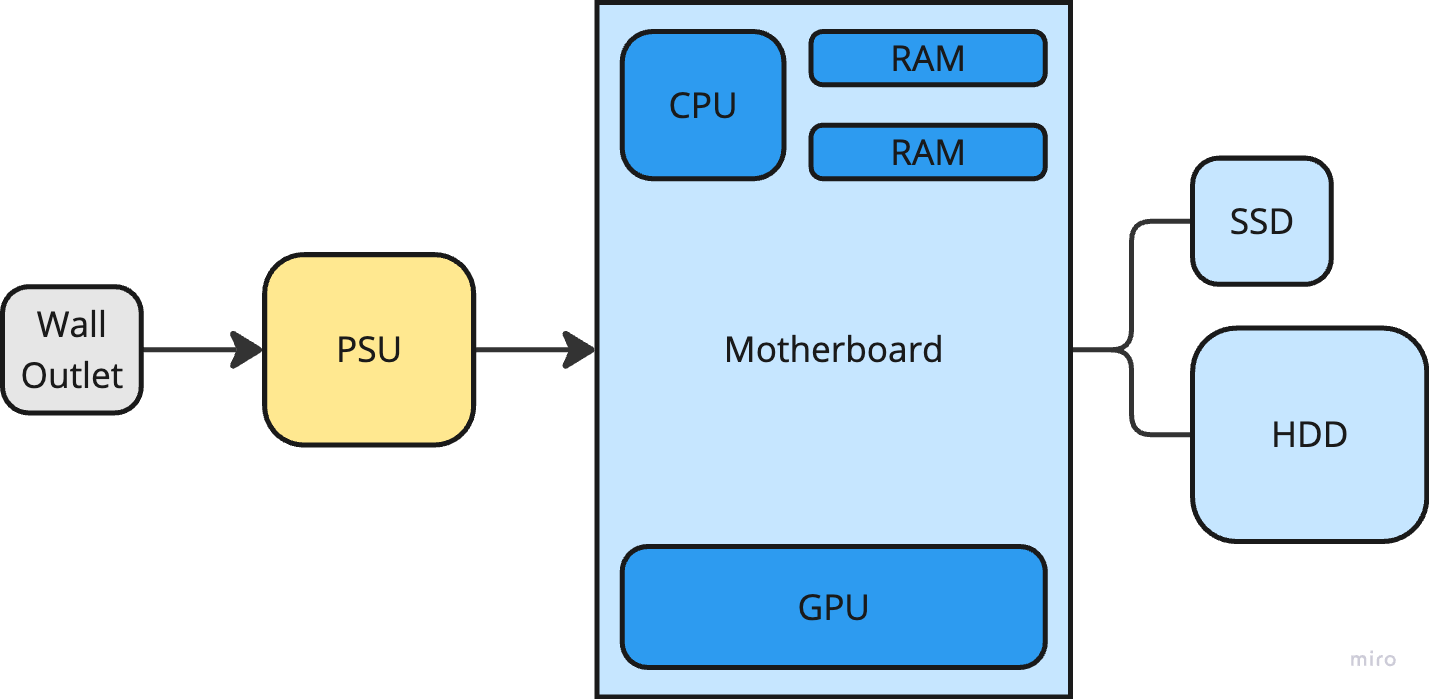
The motherboard is the main printed circuit board for a computer. It connects all the internal components, provides power, and allows them to communicate with each other. It acts like the central hub or backbone of the system.
Main Functions of the Motherboard
- Power Distribution - Sends power from the power supply to the CPU, RAM, storage, and other components.
- Data Communication - Provides pathways, called buses, for data to move between components.
- Expansion and Connectivity - Offers slots and ports for extra devices like graphics cards, USB devices, and storage drives.
Important Components in the Motherboard
- CPU Socket - Holds the CPU in place and ensures compatibility.
- RAM Slots - Connect RAM modules to the motherboard.
- Chipset - Manages communication between the CPU, memory, and other parts.
- Expansion Slots - PCIe slots for graphics cards, sound cards, and other add-ons.
- Storage Connectors - SATA and M.2 slots for hard drives and SSDs.
- Input / Output Ports - External connections like USB, HDMI, and Ethernet.
- BIOS/UEFI - Firmware that starts up the computer and controls low-level hardware functions.
Buses
- Address Bus - Sends a memory address, along with the bus from the CPU, to the memory. To fetch/write data, the CPU needs to tell the RAM the address.
- Data Bus - Sends the actual data to and from the memory.
- Control Bus - Carries commands from the CPU and status messages from other hardware devices.
Data Pathways
- System Bus - Connects the CPU to RAM and other components.
- PCI Express (PCIe) - High-speed pathway for expansion cards.
- Universal Service Bus (USB) - Connects external devices like keyboards, mice, and storage.
Form Factors
- ATX - Standard size with many expansion slots.
- Micro-ARX - Smaller, fewer slots, but compatible with standard cases.
- Mini-ITX - Compact, used for small computers.
Data Storage Devices
There are two primary types of storage devices that store data long-term in a computer: hard disk drives and solid state drives.
Hard Disk Drives (HDDs)
The Hard Disk Drive (HDD) is a long-term data storage device that uses rotating magnetic platters to store data persistently. HDDs are significantly slower at reading and writing than SSDs, but are also less expensive.
Solid State Drives (SSDs)
The Solid State Drive (SSD) is a long-term data storage device that uses integrated circuits, or flash memory, to store data persistently. SSDs are significantly faster at reading and writing than HDDs, but are also more expensive.
Power Supply Unit (PSU)
The Power Supply Unit (PSU) provides power to the internal electrical components inside a computer. The power supply converts alternating current (AC) electrical power from a wall socket to low-voltage regulated direct current (DC) electric power for the internal components of a computer.
Transistors
Inside a computer, there are millions and millions of microscopic switches called transistors. Transistors are little devices used to control electrical signals and can be either be off (no current flow) or on (current current flow). They are one of the basic building blocks of modern electronics because they can be used to represent binary data.
Transistors are semi-conductors that are made using a semi-conductive material called silicon. Semi-conductors live between a conductor, where current flows freely, and an insulator, where current doesn't flow freely, meaning they allow current to flow freely some of the time. A voltage or current can be applied to a transistor to change its state.
Transistors have three terminals - the collector, the base or gate, and the emitter.
Storing Digital Information in a Computer
Both RAM and data storages devices are measured in terms of their total byte capacity.
Common Amounts of Storage in Bytes:
- 1 kilobyte (kb) - 2^10 or 1,024 bytes
- 1 megabyte (mb) - 2^20 or 1,048,576 bytes (also 1,024 kilobytes)
- 1 gigabyte (gb) - 2^30 or 1,073,741,824 bytes (also 1,024 megabytes)
- 1 terabyte (tb) - 2^40 or 1,099,511,627,776 bytes (also 1,024 gigabytes)
Note: When something is being stored on a data storage device, all that is being stored is binary (1s and 0s).