Clients & Servers
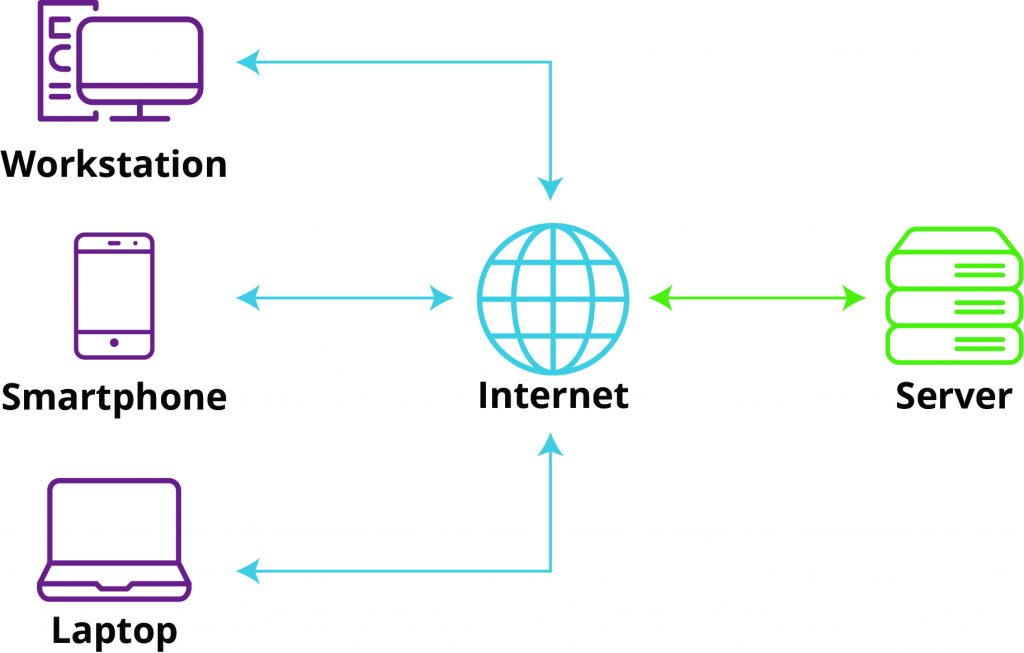
Computers connected to the internet are called clients and servers. Clients ask for data through requests, and servers give back data through responses.
- Clients include internet-connected devices, like a computer connected to the Wi-Fi, or a phone connected to a mobile network, as well as web-accessing software available on those devices like web browsers and social media applications.
- Servers are computers that store web pages, websites, or web applications. When a client device wants to access a web page, a copy of the web page is downloaded from the server onto the client machine to be displayed in the user's web browser.
Clients
- Ask for information through requests
- Can be anything that initiates a request - a user's device, web browser, phone, or application
- Can be powered on and back off again
- Web Browsers - Web browsers (like Google Chrome) act as clients because they send requests to web servers to retrieve web pages and other resources.
- Applications and APIs - Frontend applications (such as JavaScript running in a browser) act as clients when they request data from a server. Backend APIs can also act as clients when they make requests to other APIs or services.
Web Browsers
Web Pages
A web page is a document that is displayed in a web browser and is part of the World Wide Web (WWW). It contains information and is hosted on a web server, and can include text, photos, videos, and links to other web pages.
Web pages consist of three main languages:
- HTML - A markup language that defines the structure of the web page.
- CSS - A style sheet language that defines the styling of the web page.
- Presentation - Text styling, fonts, color, size, background colors.
- Layout - Where different elements are positioned on the screen.
- JavaScript - A scripting language that defines the interactivity of the web page.
Servers
- Listen for requests and send back information through responses
- Typically store data
- Are usually always on - they need to be able to respond when prompted
There are two main types of servers: local servers and internet servers.
- Local servers are used for local development.
- Internet servers are used for production.
Protocols
Clients send requests to servers, and servers send back responses. They communicate using protocols.
A protocol, or network protocol, is a set of rules that govern how data is transmitted between devices.
Protocols define:
- How messages are structured
- How connections are made
- How data is transmitted and interpreted
Some common communication protocols include:
- Internet Protocol (IP)
- Transmission Control Protocol (TCP)
- Hypertext Transfer Protocol (HTTP)
- WebSockets
Ports
Servers have ports. More specifically, they usually have around 65,535 ports.
A port is a numbered entry point that tells the operating system which application/system should receive the network traffic.
Ports are numbered virtual doors that listen for incoming requests and direct them to the correct application.
Applications can use ports, but they do not inherently own a fixed port.
- Port 21 - FTP
- Port 22 - SSH
- Port 25 - SMTP
- Port 53 - DNS
- Port 80 - HTTP (the web)
- Port 443 - HTTPS (the secure web)
- Port 5432 - PostgreSQL
How They Work Together
The server can be thought of as an entire restaurant. The address of the server is the IP address. The Port is the specific order window or kitchen door. The client request is you asking for a burger (data), and the response is the burger delivered to you (the web page content).